Field Manual · Rev. 1
The 20MM User Guide
Everything you need to start the march. Read the quick start, then work through the screens in order — or jump to whatever's in front of you.
Quick start
Set up a pursuit
Deep Work → (+) New pursuit. Name the thing you want to master and set an hours goal. One is enough to start.
Do a morning check-in
Open Today and answer the check-in. Thirty seconds — it sets the day's intent.
Run one focus session
Focus → pick your pursuit → start a timer. Twenty minutes counts. The hours begin here.
Close the day with a log
Back on Today: write a line or two, set mood and energy. Day one is on the record.
That's the basics for your first entry. Everything below is more in depth, not requirement.
01 The idea
In 1911, two expeditions raced to the South Pole. One team marched roughly the same distance every day — in good weather and bad. The other sprinted when conditions were fine and sheltered when they weren't. The steady team arrived first and came home. Jim Collins called this the 20 Mile March: consistent daily progress beats sporadic sprints.
20MM is that principle turned into a daily practice. You pick the work that matters — your pursuits — and you show up for them every day. Not heroically. Repeatedly.
The app tracks three things: what you did today, how you felt doing it, and how the hours accumulate over months and years. Mastery is the sum; the daily log is the unit.
02 Today — the daily log
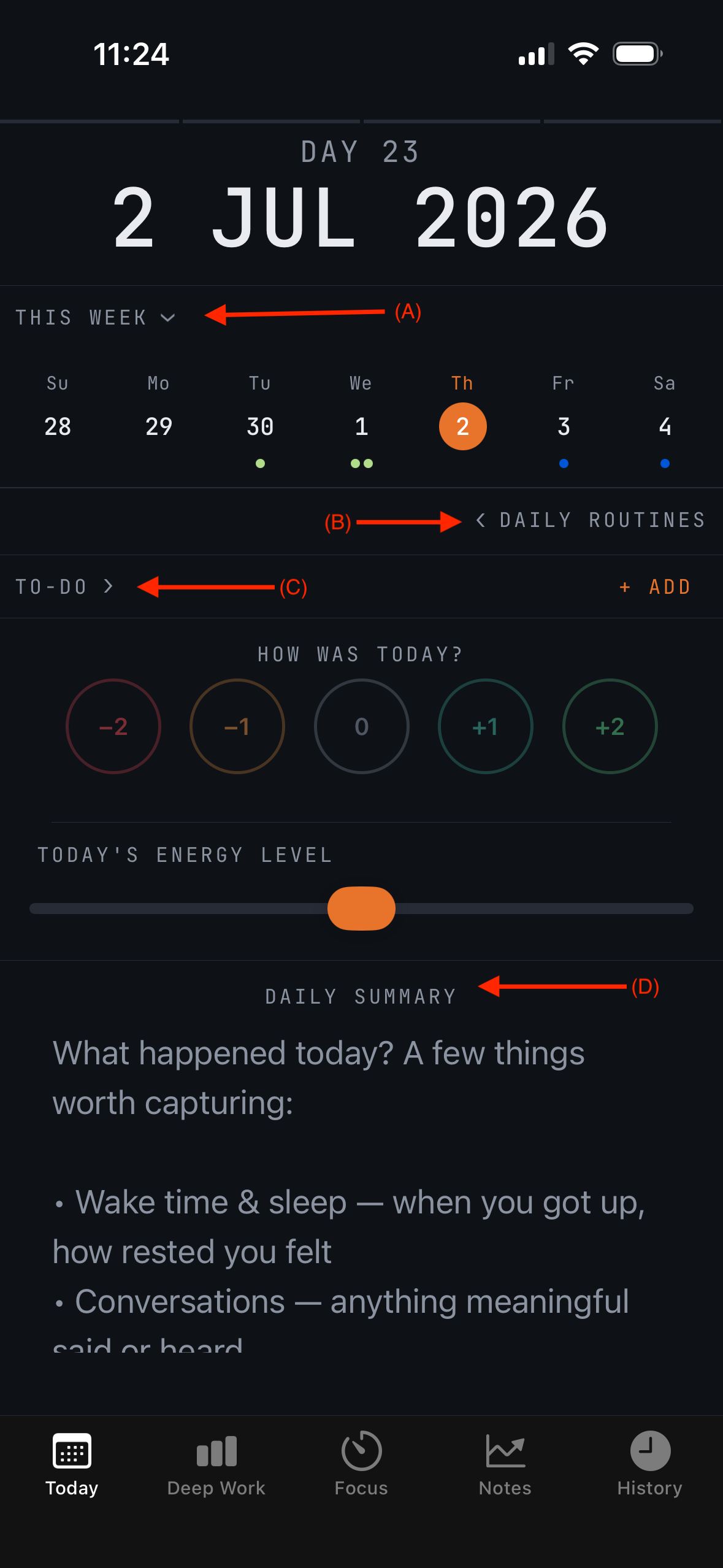
The Today tab is your daily base camp. Everything you record about a day lives here, and a complete entry takes under a minute.
- Morning check-in
- A brief prompt at the start of the day: how you slept, how you feel, what today's march looks like. Optional, but it anchors the day before the day happens to you.
- THIS WEEK (A)
- A weekly view of your device's native calendar, right on Today. Upcoming appointments and meetings sit alongside the day's march, so nothing on the schedule gets forgotten. Grant calendar access when prompted; 20MM only reads events — it never edits them.
- DAILY ROUTINES (B)
- Add in recurring daily items — the non-negotiables. Define them once; check them off each day. Routines are tracked based upon consistency; helping to ensure you get all the little things done.
- TO-DO LIST (C)
- This is the place to input tasks needing completion in the future. Unfinished items from the Task Pool roll over into this section so unfinished tasks are never lost.
- DAILY SUMMARY (D)
- A short written summary of the day, plus mood and energy on simple scales. This is the record your History and Field Notes are built from — a sentence or two is enough.
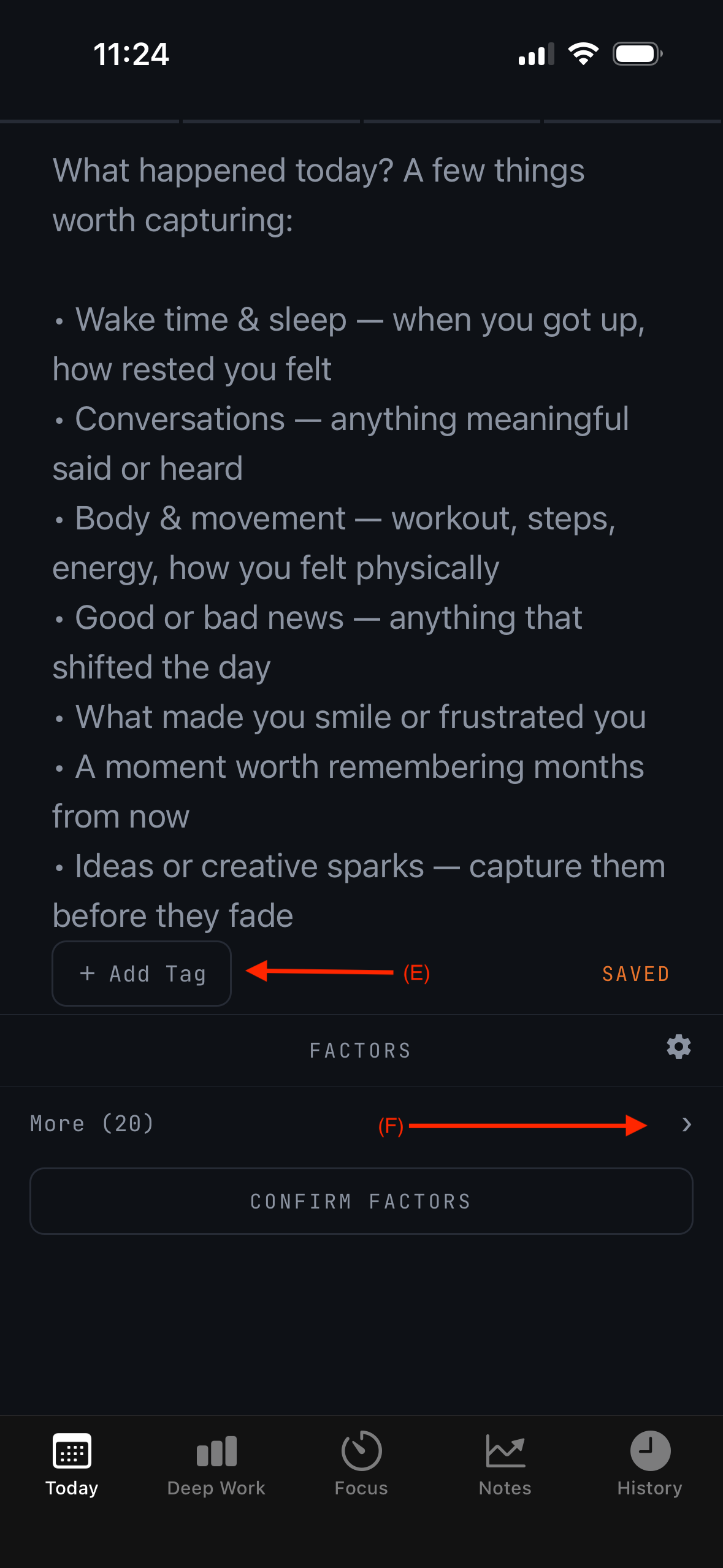
- DAY TAGS (E)
- Tag the day (travel, sick, milestone completed) so notable days are easy to find and compare later in History and Field Notes.
- FACTORS (F)
- Log factors which affect your day like caffeine, exercise, or late night screen time. With time, Field Notes correlates these against your mood and output — this is how you learn what actually moves your work output needle.
03 Focus — the timer
Focus is where hours are earned. Pick a pursuit, start a timer, work. Every completed session lands in your Deep Work totals automatically.
Pomodoro
Fixed intervals with breaks. Good when you need structure to start, or the work is heavy and you want permission to stop.
Elapsed
An open stopwatch. Good when you're already moving and don't want an interval breaking your stride. Stop when you stop.
Meditate
A quiet countdown for a mindfulness practice — set a duration, settle in, and a gentle tone marks set intervals and the end. Sessions log to their own category, separate from your work hours.
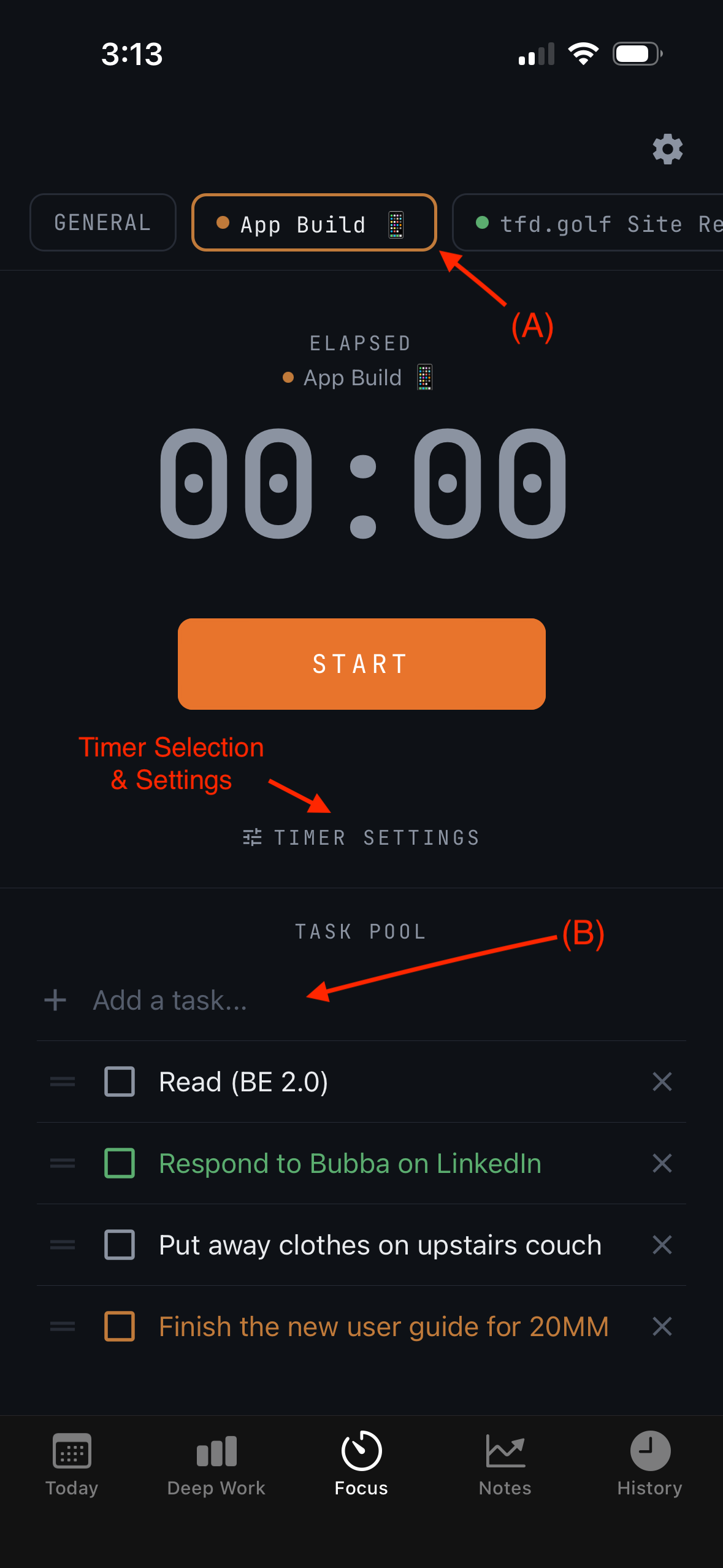
- PURSUIT SELECTION (A)
- Every session belongs to a pursuit, so the hours count toward something. If the work doesn't fit a pursuit yet, log it under General and sort it later.
- WORK QUEUE / BRAIN DUMP (B)
- Mid-session thoughts — errands, ideas, the email you forgot — go in the queue instead of your head. Capture in two seconds, return to the work, triage after the timer ends.
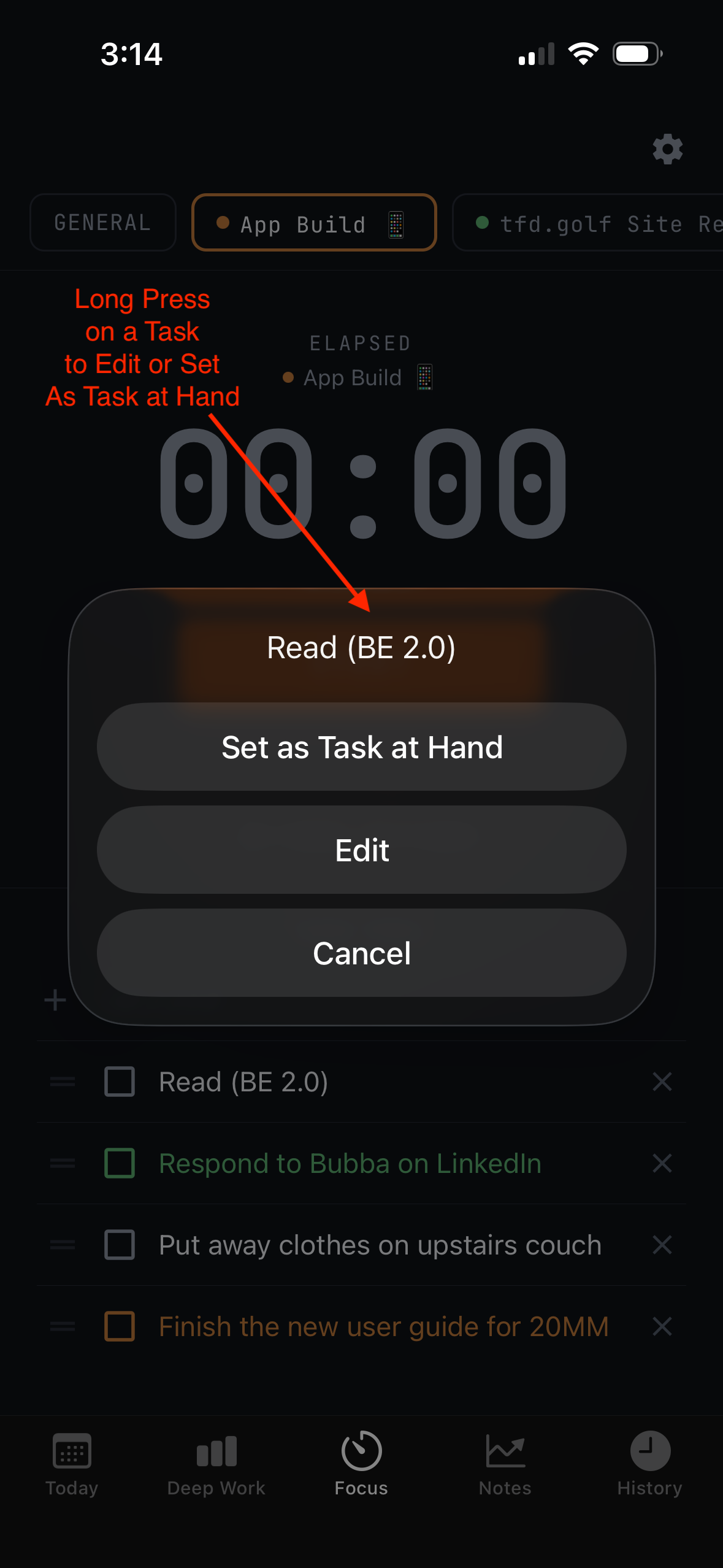
- Task at hand
- Long-press any task in the Task Pool to set it as the current Task At Hand. It stays pinned front and center during the session — one task, one march — until you complete it or long-press another to take its place.
04 Deep Work — the ledger
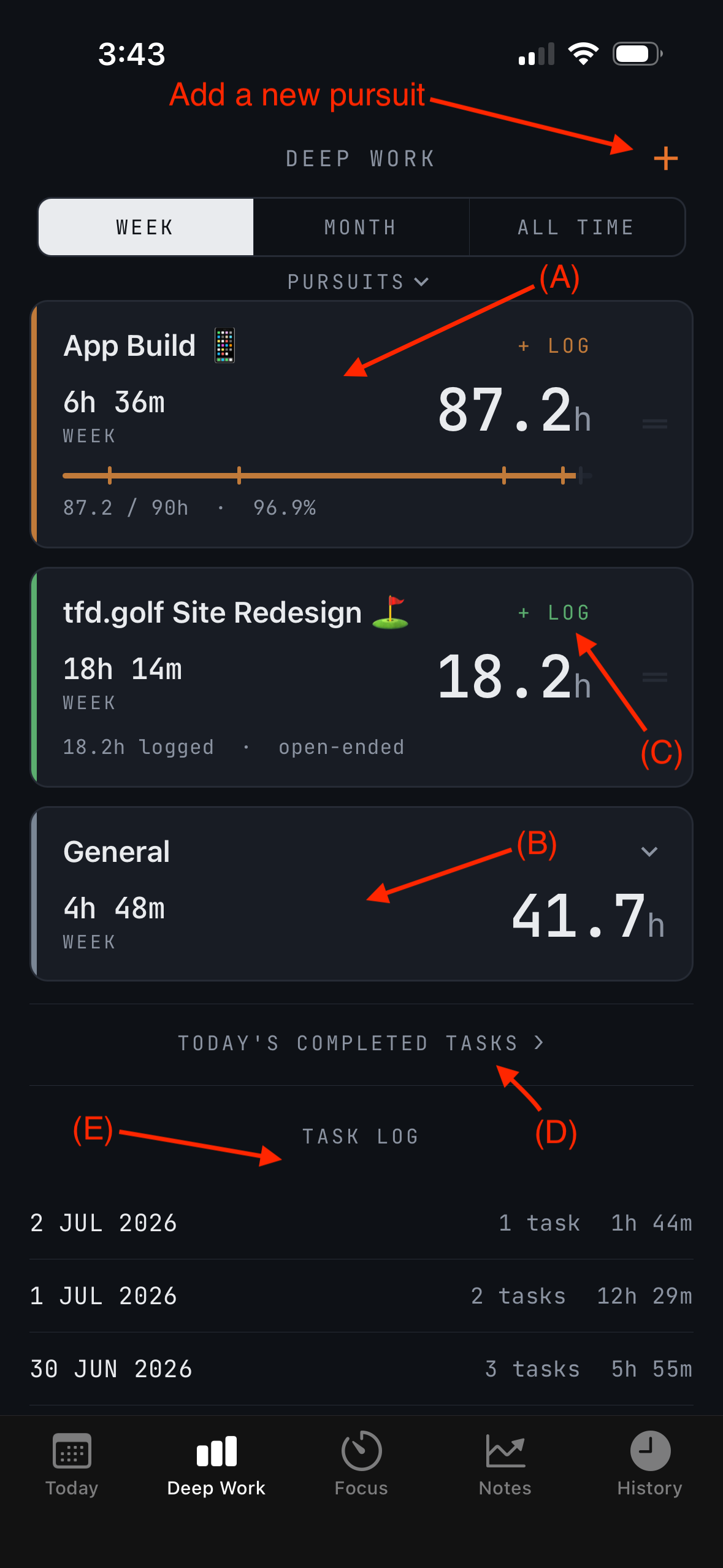
Deep Work is the running ledger of hours: every session, every pursuit, totaled over weeks, months, and years. This is where the march becomes visible.
- PURSUITS (A)
- The named bodies of work you're accumulating hours toward — a book, a language, a craft. Each carries its own total and history.
- GENERAL (B)
- The catch-all for focused work that isn't a pursuit. You can split it into subcategories (admin, reading, planning) so the catch-all still tells you something.
- MANUAL ENTRY (C)
- Worked away from the app — a whiteboard session, a flight, a notebook morning? Add the hours by hand. The ledger should reflect the work, not just the timer.
- Today's Completed Tasks (D)
- A daily capture of tasks marked completed for the day.
- Task Log (E)
- A quick glance log that displays the number of tasks and amount of deep work logged per day.
05 Field Notes — what the data says
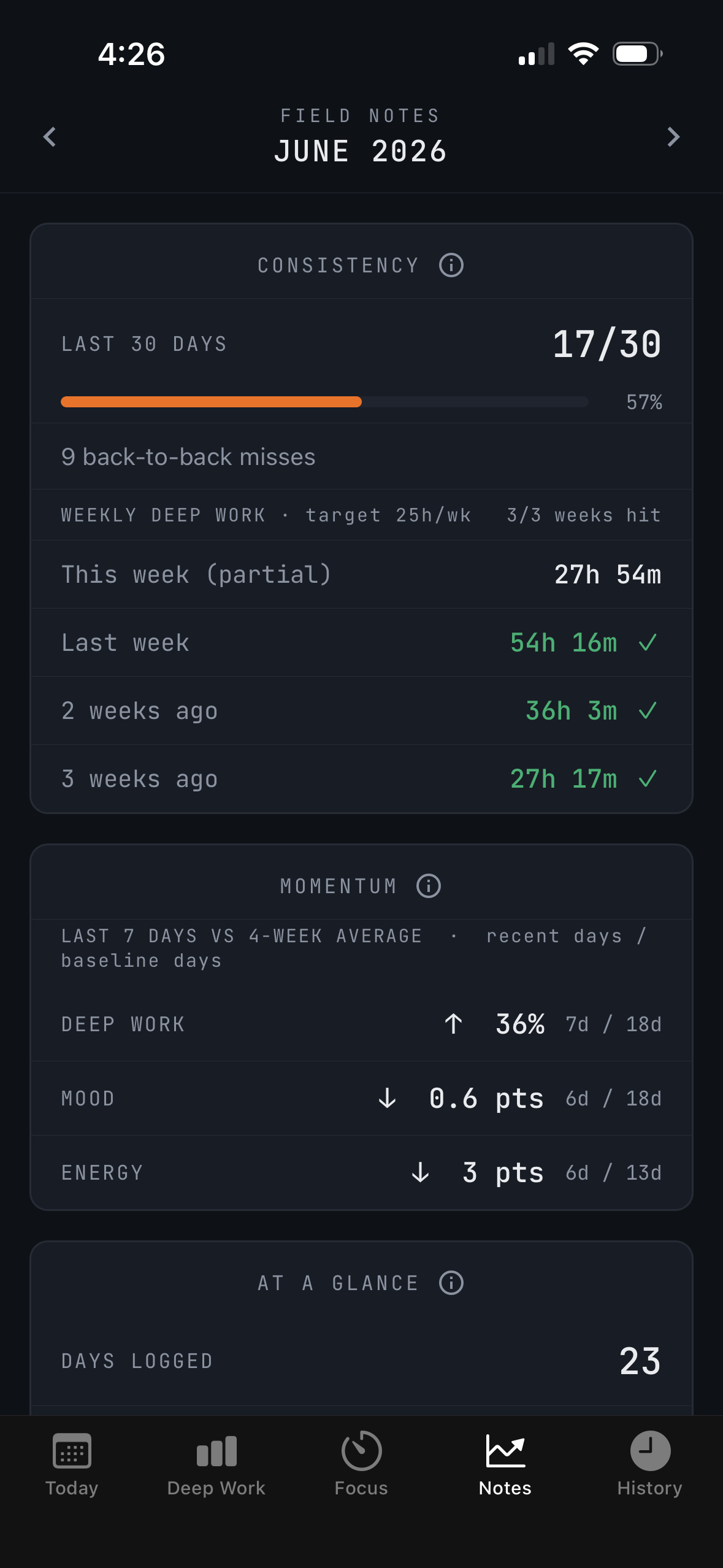
Field Notes provides a summary of your log back to you. Three views:
- Debrief
- A monthly summary of the march: days logged, hours by pursuit, mood over the month, notable stretches. The end-of-month campfire review.
Free vs. Pro: the monthly Debrief is included for everyone. Trends and Patterns/Correlations are part of Field Notes Pro. See section 08.
- Trends
- Mood, energy, and hours over time. Is the average moving? Is the pace holding?
- Patterns & correlations
- Where your logged factors meet your outcomes. Days with morning exercise vs. without; caffeine against afternoon energy. Correlations, not verdicts — but over months they point somewhere.
06 History — the trail behind you
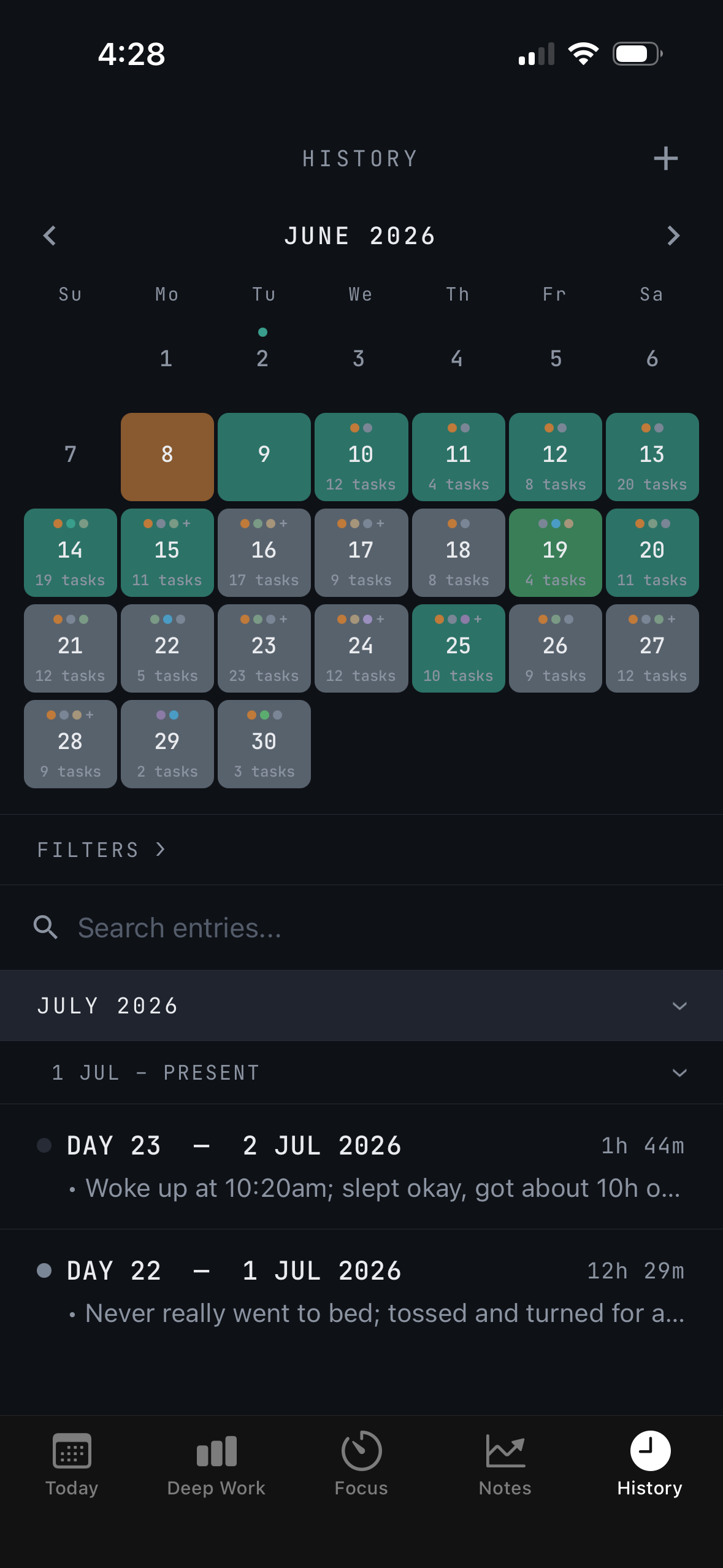
Every logged day is kept. History lets you walk the trail backwards.
- Browsing past days
- Open any past day to see its full record: summary, mood, energy, sessions, tags.
- Mood heatmap
- Shows months at a glance. Clusters of good and bad days become obvious in a way single entries never are — a rough February looks different when you can see it.
- Search & filter
- Finds days by text, tag, or factor. "Every day tagged travel," "every day I mentioned the launch" — the log becomes answerable.
07 Pursuits in depth
A pursuit is a long expedition, planned like one.
- Goal planning
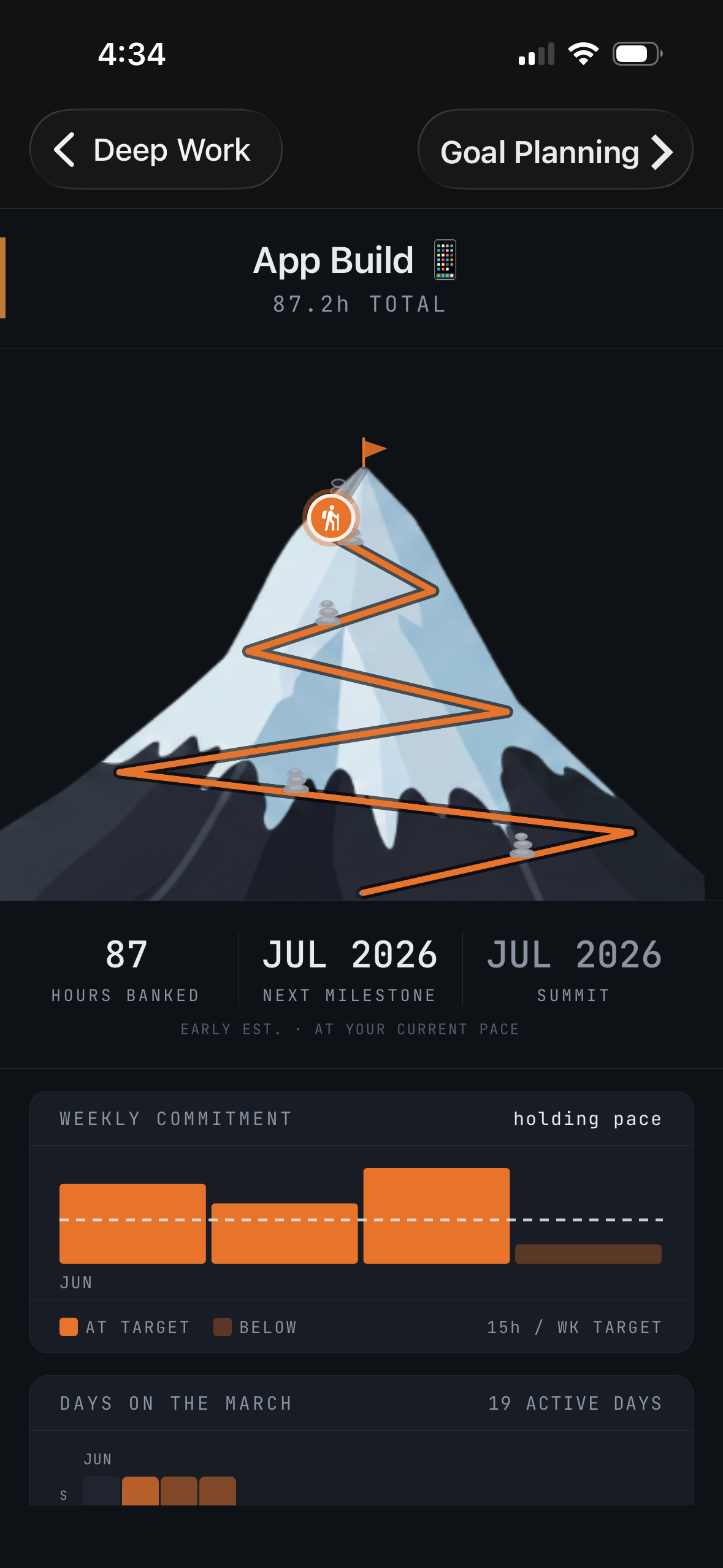
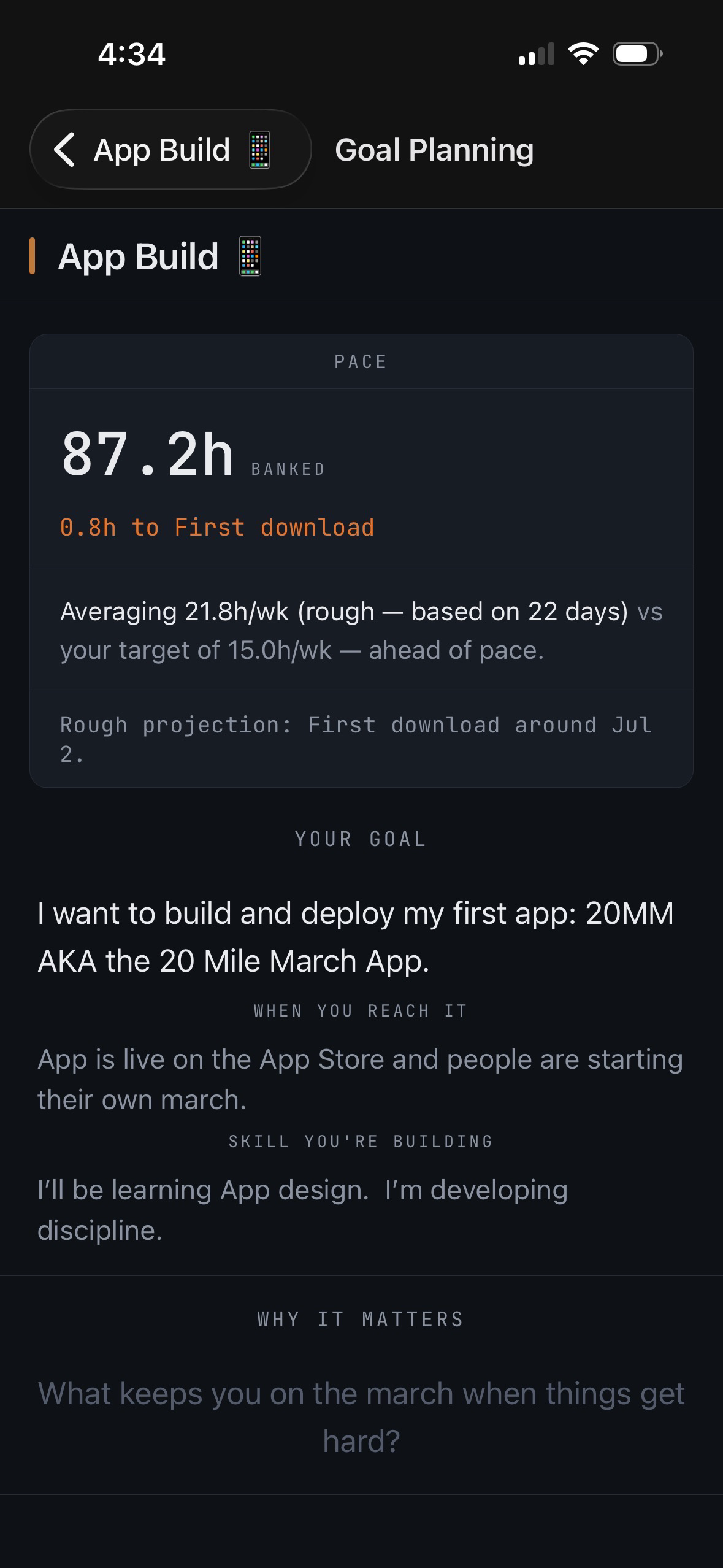
- Set the destination in hours — 500 toward the language, 1,000 toward the craft — and a daily or weekly pace you can hold in bad weather, not just good.
- Milestones
- Named waypoints along the route — first 100 hours, draft finished, first conversation held. Passing one gets a quiet marker in your log, nothing louder.
- The mountain
- Each pursuit is drawn as a mountain: base is zero, summit is the goal, and your accumulated hours are the altitude climbed. Milestones sit on the slope where they'll be reached.
- Pace ribbon
- A strip showing actual pace against planned pace. Ahead, behind, or on the line — visible in one glance, week by week.
- March log
- The pursuit's own chronology: every session, milestone, and note in one running record — the story of the climb, told in entries.
08 Free vs. Field Notes Pro
The march itself is free — permanently. Pro adds the analysis on top.
Free
- Daily log, mood & energy
- Routines, to-dos, tags & factors
- Focus timers, work queue
- Pursuits & deep work ledger
- Full history & heatmap
- Monthly Debrief
- Up to 3 active pursuits
Field Notes Pro
- Trends over time
- Patterns & correlations
- Advanced history filters
- Extended pursuit analytics
- Unlimited active pursuits
- Redeeming a code
- Settings → About → Redeem code. Enter the code exactly as written; Pro unlocks immediately on the device.